
 Audhive – a product by IT SB
Audits and internal controls – in one place, traceable.
Audhive brings together your controls, evidence, audits and reports in one web app. ISO 27001 and the Swiss ICT minimum standard are included, and you import your own frameworks yourself. As a cloud subscription operated by us – or self-hosted on your own server.
Everything an audit needs
From the control and the evidence to the report for management – in one connected platform.
Controls and frameworks
ISO 27001/27002 (94 controls) and the Swiss federal ICT minimum standard (108 controls) come ready to use. Every control can be adapted to your interpretation, assigned and measured; your own frameworks are added via CSV.
Audits with evidence
Capture, organise and review evidence directly on the control – every finding backed by a documented record with a timestamp. That way an audit can be substantiated at any time.
Messages per control
Auditors and control owners talk directly on the control: request evidence, ask questions, accept or reject. No email chains, everything stays with the audit.
Questionnaires
Run structured risk assessments and control questionnaires. The answers flow straight into the scoring and the evidence.
Reports and dashboards
Audit data turns into overviews and PDF reports that make sense without specialist knowledge – always up to date.
Multiple tenants
Business units, subsidiaries or clients in one platform, cleanly separated from each other. Roles and permissions decide who sees and edits what.
Open format
Import frameworks from any source via CSV and export the whole library in one file at any time – in the same format. No lock-in.
Complete audit log
Every action, every change and every sign-in is recorded and can be exported for compliance reports or investigations.
AI assistant – optional
Ask questions about audits and controls or have the implementation of a control reviewed – with your own access to Claude or ChatGPT. AI access is not included in the price – more about this.
Security, internal controls or both
Audhive comes in three modes. It is licensed per tenant with a number of users per tenant; additional users are shared across all tenants.
SEC – security audit
For IT security teams: ISO 27001 included, collect and review evidence, scoring and reports as PDF.
ICS – internal controls
For internal audit and the internal control system: control assessments, risk-based questionnaires, a scoring model, policies and control effectiveness.
FULL – both
Security audit and internal controls in one installation, with shared administration, questionnaires and reports across both modules.
In the cloud: what it looks like
You order online, we set up and run your instance. A few minutes later you are working in your own Audhive instance.
Choose a plan and an address
Monthly or yearly, in security mode, internal controls mode or both. You choose the address of your instance, for example yourcompany.audhive.io, and pay via PayPal or by card.
Your instance is set up
As soon as the payment is confirmed, your instance is set up automatically – with its own database. A few minutes later the welcome email arrives with your setup link (valid for 72 hours).
Secure your account and start
With the link you set your password, set up an authenticator app or a passkey and create the first tenant – then you work directly in Audhive.
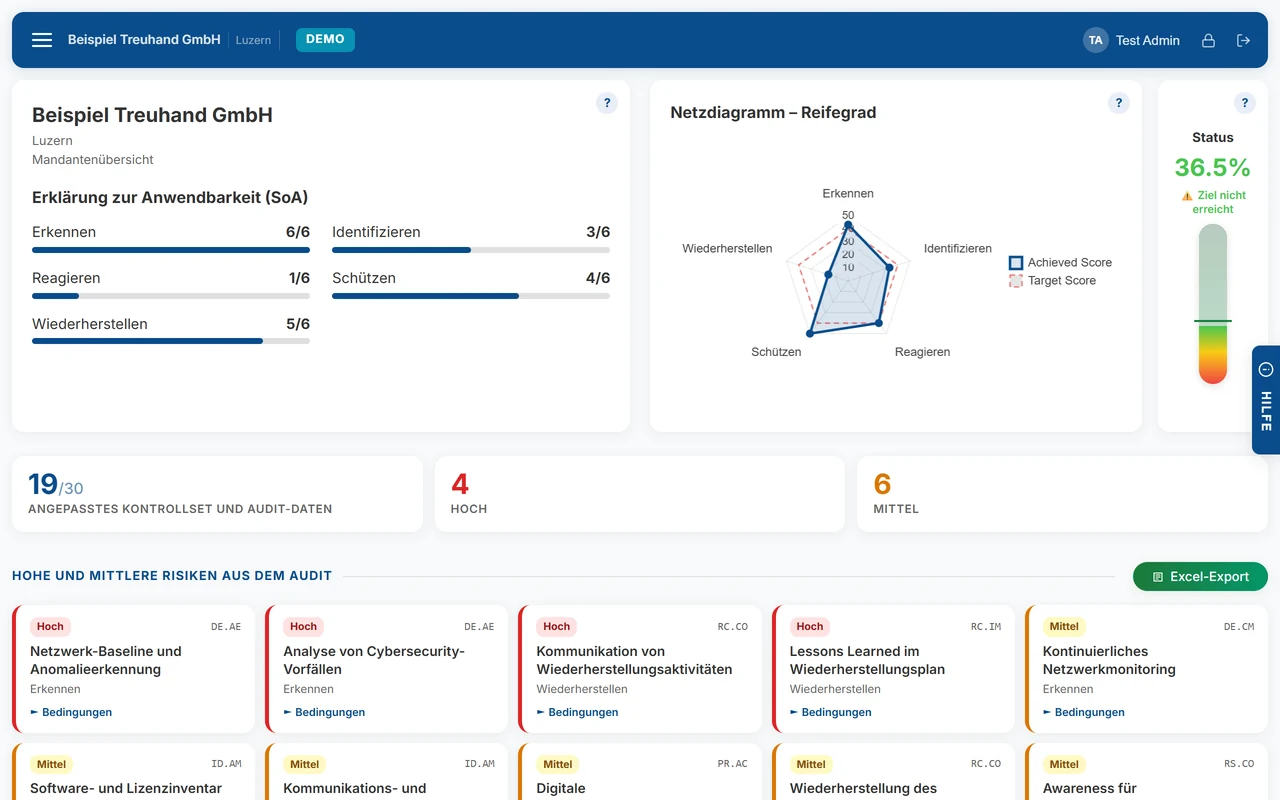
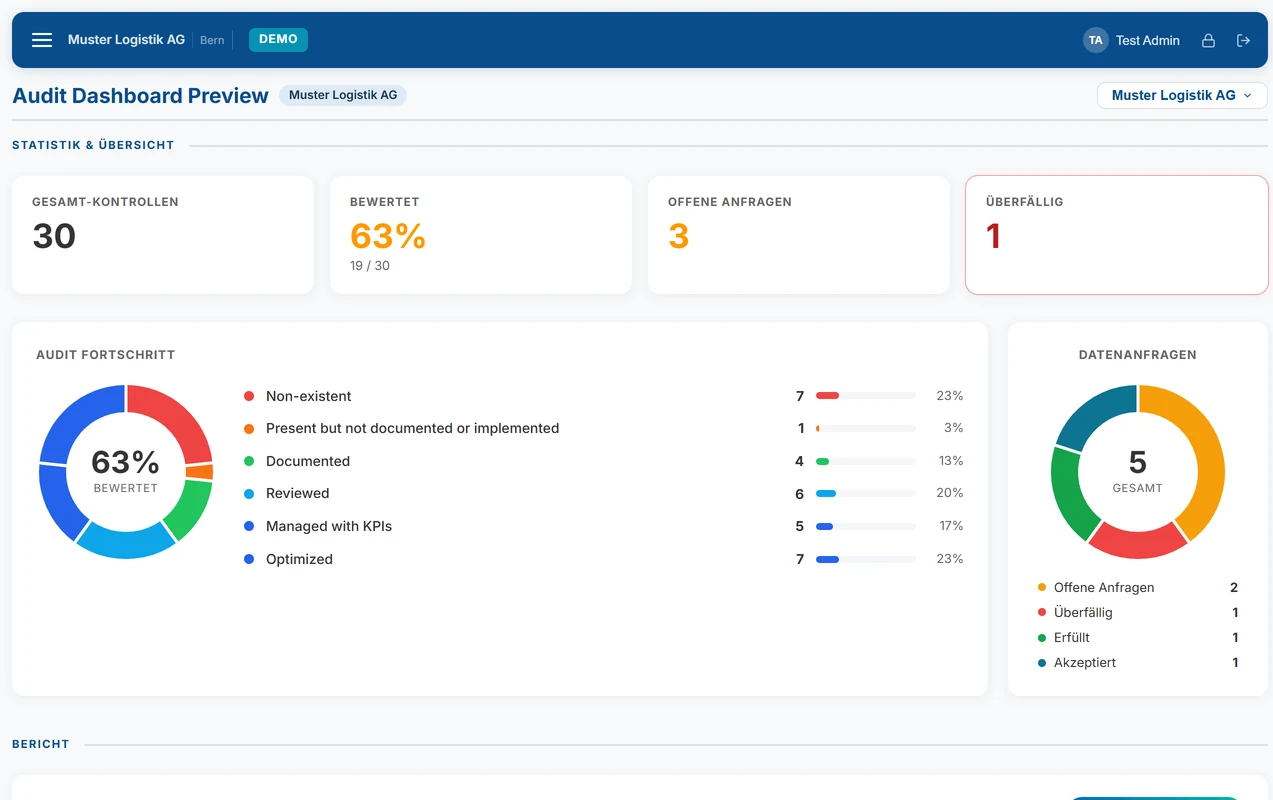
The images show the demo instance with fictitious data (interface language German; Audhive is also available in English).
Run by us
We install updates for you. Backups are made every night, centrally and encrypted; you can export your data yourself at any time.
Scope from your plan
Mode, tenants and users follow from the plan you choose. If you need more, you can add tenants or users at any time.
Cancel at the end of the term
The subscription renews automatically and can be cancelled at the end of the term – in Audhive or with a message to us.
Self-hosted: how the installation works
Audhive runs on your own web server. A wizard in the browser guides you through the setup; the licence is activated online.
Buy a licence
Choose a package and pay online. The licence key and the download link arrive by email; the link checks your key and can be reused as long as the licence is valid.
Prepare the server
A web server with HTTPS and PHP 8.1 or newer, plus an empty MySQL or MariaDB database with its own user. The details are in the questions below.
Unpack and start the setup
Unpack the ZIP into the web folder and open setup/setup.php in the browser. To start, the wizard asks for a one-time setup token that it stores in a file on your server – so nobody else can take over the setup.
The wizard guides you
Licence agreement, database (new or from a backup), sign-in with Microsoft Entra ID or with your own accounts and two-factor sign-in, optionally email sending and finally the licence key.
Activate the licence online
"Check key" activates the licence online. Mode, tenants and users come from the key; the licence covers one installation. Afterwards you delete setup/setup.php.
In operation
Audhive checks the licence online every 7 days and keeps working for up to 30 days without a connection. As an administrator you get updates from our update service – digitally signed, with a backup before they are applied.
As a cloud subscription or self-hosted
The same software, two ways: we operate Audhive for you, or you install it on your own server. You will find the current prices below and when you order.
As a subscription (cloud)
Your own instance at yourcompany.audhive.io, operated by us – with its own database, updates and central backups. Monthly or yearly via PayPal, cancellable at the end of the term.
Self-hosted (on-premises)
On your own server – your data stays in your environment. The licence covers one installation, is activated online and keeps working for 30 days without a connection. You receive the download link with the licence email.
With support
We help with the installation on your server and train your audit and compliance team – on site or remotely, by arrangement.
Subscription (cloud) – prices
Self-hosted – packages
Already a customer? Add tenants or users · For partners and resellers: resell or refer Audhive
Built for teams where security is a must
Those who run audits need clear access rights and a complete trail themselves.
Strong sign-in
Sign in with a passkey or an authenticator app (TOTP) – or via single sign-on with Microsoft Entra ID, without additional identity infrastructure.
Roles and tenants
Permissions down to individual modules: tenant admins, global admins, read-only auditors. The data of the tenants stays separated.
Your data
Self-hosted, all data stays on your server. In the subscription, every instance has its own database; backups are made centrally and encrypted. Updates are digitally signed.
Frequently asked questions
Subscription or self-hosted – which suits me?
With the subscription we take care of servers, updates and backups; you order online and work in your own instance within minutes. Self-hosted, Audhive runs on your own server – useful if the data must not leave your environment or if you operate Audhive for several clients yourself. The features are the same.
How is it licensed?
Per tenant, with a number of users per tenant, plus optional additional users shared across all tenants, and the chosen mode (security, internal controls or both). What a package contains is shown when you order or on the purchase page.
What do I need to self-host Audhive?
A web server with PHP 8.1 or newer (8.2 or 8.3 recommended, with the extensions pdo_mysql, zip, gd, mbstring and openssl), MySQL 8.0 or MariaDB 10.6 and Apache 2.4 with mod_rewrite or nginx with php-fpm, plus HTTPS. Evidence files are stored in the file system. The licence covers one installation, is activated online and checked online every 7 days. If you move to another server, release the licence in Audhive and activate it there again.
How do updates arrive?
With the subscription, we install updates. Self-hosted, Audhive fetches new versions through our update service with a valid licence; the packages are digitally signed and verified before installation.
Can I add tenants or users later?
Yes – with the subscription as well as with the self-hosted licence. When ordering, you can choose additional tenants and users right away; later you add them via add tenants or users. You then only pay the pro rata amount until the next payment or until the licence expires; with the subscription, the new price applies from the next payment. Reductions are possible on request.
Are there terms for partners and resellers?
Yes. IT service providers, fiduciary, audit and consulting firms can resell or refer Audhive – terms by agreement. Find out more on the page for partners and resellers.
Can I try Audhive first?
Yes. Request a demo at audhive.io – you receive personal access to a demo instance with sample data.
Do I need the AI features?
No, everything works without them – except the AI features themselves. If you use them, you need your own API access from Anthropic (Claude) or OpenAI (ChatGPT), which you purchase yourself from the provider; it is included neither in the licence nor in the subscription.
Which languages is Audhive available in?
The interface is available in German and English. Content such as controls and audits can be translated into further languages with the optional AI translation.